
NCC 2019 Temperature Range Check and Thermal Comfort Plugin
This plugin for DesignBuilder, developed by DesignBuilder Australia, will help you to perform the thermal comfort and temperature range checks required in NCC 2019 Section J.
The plugin generates a report showing the number of operation hours each zone in a building is within the target temperature and thermal comfort score (PMV) range, and whether the building as a whole meets the NCC 2019 criteria. The report is in html format and can be shared online or copied and pasted into Microsoft Word or other applications.
Click here to open a sample report.
You can download the DBA Plugins free of charge.
Plugin Documentation
Before using the plugin, the building model and simulation settings need to be set up appropriately. A printed manual for the plugin can be downloaded below:
Full details of the hours of operation included in the plugin analysis are included in the following document:
There is also a video tutorial and troubleshooting guide – see below. These guides are for an earlier version of the plugin – some of the menu options and dialog boxes have changed, however the model setup and steps to generate a report are the same.
Video Tutorial
Video Troubleshooting Guide
Purchasing a Licence
When you first install the plugin it is in demo mode. You have 14 days to evaluate the plugin before purchasing a licence to continue using the plugin.
For pricing options, contact DesignBuilder Australia .
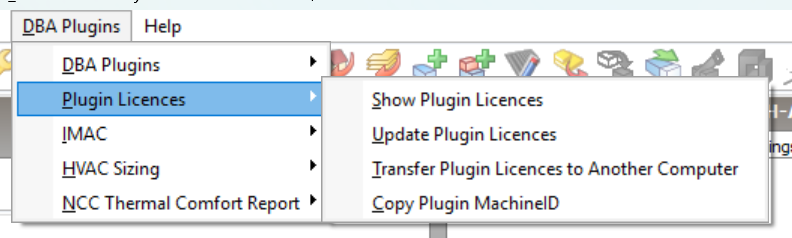
When you are ready to purchase a licence, please contact DesignBuilder Australia with your unique machine ID. This is available through the plugin menu options DBA Plugins | Copy Plugin MachineID (to copy the ID to your clipboard) or Show Plugin Licences (show your MachineID and the current status of your plugin licences).
Renewing a Plugin Licence
Purchased licences are issued for 12 months. When it is time to renew your licence, please contact DesignBuilder Software Australia to purchase a new licence. Detailed written instructions on how to renew your licence are available below:
Upgrading the Plugin
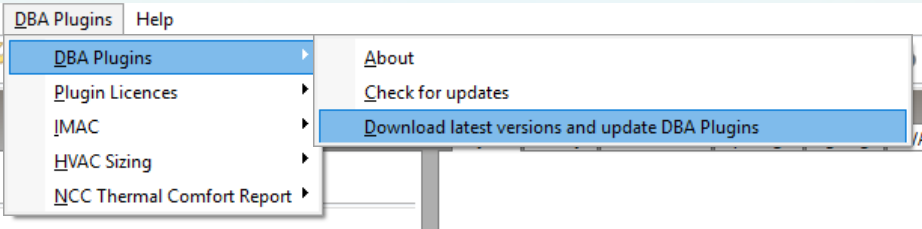
It is highly recommended that you keep your plugin updated to the latest version. If a new version is available, a notice will be displayed at the top of the DBA Plugins menu. Choose DBA Plugins|DBA Plugins|Download latest versions and update DBA Plugins to download and install the latest versions of the plugins – note that you will need to save your work and close DesignBuilder as part of this process.
Your licence information will be preserved during the upgrade process.
Uninstalling the Plugin
To uninstall the plugin, click on the Windows key, then select  (Settings)|Apps.
You will find the plugin listed under “Design Builder Software Australia Plugins” in the list of installed applications. When you click on the plugin name, choose ‘Uninstall’.
Your plugin licence is preserved when you uninstall, so you can reinstall the plugin later and your licence will be restored.
If you have multiple user accounts on one computer, each user must install the plugin separately, however the plugin licences are shared between users on the same computer. If one user uninstalls the plugin, this will not affect any other users.